Hi. Recently most of my C projects have been geared towards gnu/linux. So i thought why not make something in windows too. Well after brainstorming for quite a while ive landed on the idea of making a program that uses my laptops webcam to render the frames in the terminal with ascii.
starting out #
okay i had the idea mapped down but i didnt know where to start, how are u supposed to access the webcam and get the frame? I decided to just focus on the terminal side of things for the time being. It came down to this:
- a
Framestruct withwidth,height,stride(because some cameras can add empty padding to frames so this was supposed to be a future safeguard against it), and a pointer to the pixels - create and destroy functions
- a gradient fill for testing
- printing the results with a ramp so you can take advantage of the "brightness" data.
making it do more than only turn off and on is a nice touch. I also wanted to start organizing my projects more so i started splitting files into .h and .c
typedef struct {
    int width;
    int height;
    int stride;
    uint8_t *pixels;
} Frame;

bool frame_create (Frame *f, int width, int height);
void frame_destroy (Frame *f);
void frame_fill_gradient (Frame *f);
filling the terminal with a gradient #
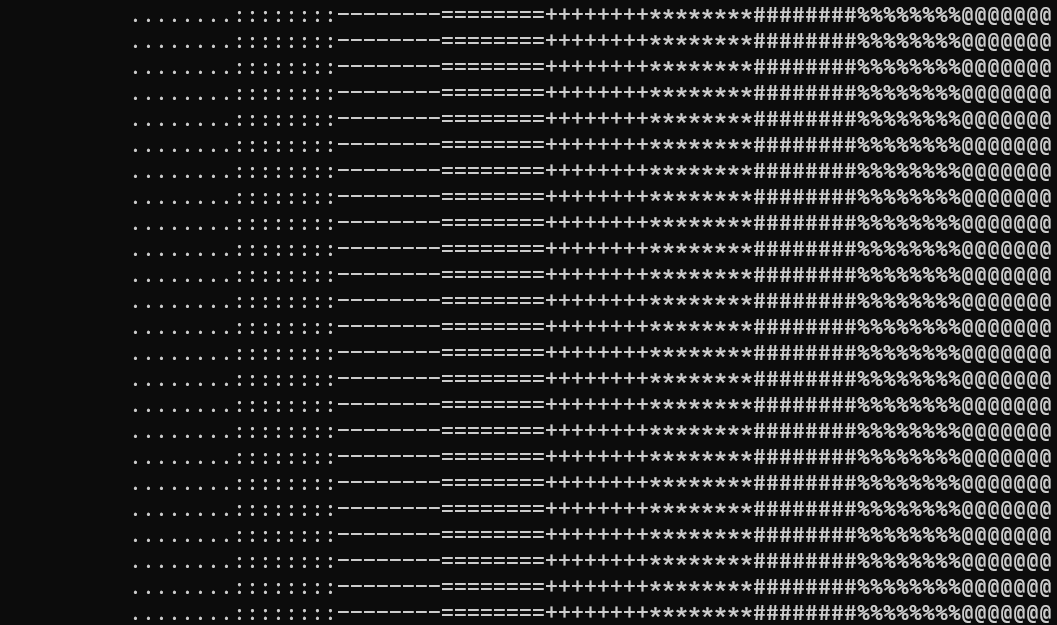
Now it was time to make the frame_fill_gradient function, after defining the other functions. The core idea is for the Frame.pixels variable to hold 8 bits (256 different values from 0 to 255) for the brightness and for it to have width*height bytes of memory.
So the frame_fill_gradient function should loop through the rows and columns and change the pixels brightness relative to where the pixel is in the frame. Think of it as a grid, but to store it in C you have to store it in one continuous row of bytes.
void frame_fill_gradient (Frame *f) {
    for (int y = 0; y < f->height; y++) {
        for (int x = 0; x < f->width; x++) {
            // brightness goes from 0 at the left edge to 255 at the right edge
            int brightness = x * 255 / (f->width - 1); // left to right gradient

            f->pixels[y * f->stride + x] = (uint8_t) brightness;
        }
    }
}
the secret sauce is the scaling formula: current column * 255 (max brightness value) / (the total width of the frame - 1).
the -1 is there because the columns are numbered 0 to width - 1, not 1 to width. The last column is x = width - 1 and i want that one to be exactly 255. Plug it in: (width - 1) * 255 / (width - 1) = 255. Without the -1 the last column lands a bit under 255 and the gradient never reaches full white.
also notice the multiply comes before the divide. These are ints, so x / (width - 1) on its own is 0 for every column except the last one (integer division throws the fraction away) and basically the whole picture would be black. Multiply first, divide last. This rule comes back like 4 more times in this project.
if you're confused about the y * f->stride + x part, its just finding the index. (think of stride as width for simplicity). multiply the current row by the total width of the frame then add it to the current column.
we then assign the brightness level to the current index of pixel we're on. (after type casting it from int to uint8_t which is fine because brightness is never going to be more than 255).
printing the result #
Okay we have the pixels set and ready to be printed. First the ramp:
static const char ramp[] = " .:-=+*#%@"; // 10 values
if the pixels brightness level is 0 it just prints an empty space, if its 255 it prints @, and anything in between it prints the values in the middle.
So we need to scale 0-255 down to 0-9
void ascii_print (const Frame *f, int cols, int rows) {
    char *buffer = malloc(rows * (cols + 1)); // +1 because each cols holds characters AND A newline
    if (buffer == NULL) {
        return;
    }

    int n = 0;

    // we subtract 2 cuz 1 is the null terminator and the other is because we want our index to start from 0
    int total_ramp_size = (int) sizeof(ramp) - 2;

    for (int row = 0; row < rows; row++) {
        for (int col = 0; col < cols; col++) {

            // secret sauce
            // DO THE multiply FIRST, because integer division THROWS AWAY fractions
            int x = col * f->width / cols;
            int y = row * f->height / rows;

            uint8_t pixel = f->pixels[y * f->stride + x];

            // scaling 0-255 down to a position in the ramp
            int ramp_index = pixel * (total_ramp_size + 1) / 256;

            buffer[n++] = ramp[ramp_index];
        }
        buffer[n++] = '\n';
    }

    fwrite(buffer, 1, n, stdout);
    free(buffer);
}
We make a buffer, put everything in it, and then print it in one go, as opposed to printing each character individually with putchar(). The total_ramp_size is the last index of our ramp. sizeof(ramp) gives 11: our 10 letters plus 1, because in C when you define strings with "" it adds a null terminator at the end. A string is really just an array of characters and the null terminator is C's way of knowing where the string ends. So we subtract 1 for the null terminator, and another 1 because we want our index to start from 0, ie: 0-9.
We then loop through the "grid" with 2 nested loops, to find the x and y values in our array we use these two formulas:
int x = col * f->width / cols;
int y = row * f->height / rows;
this took me way longer than it should have but eventually i figured it out..
After getting the values we get the pixel value of the current pixel and scale it down to a position in the ramp. Ie: 255 becomes 9 (highest value of our ramp) which is @ in our case.
we add that character to the buffer whilst incrementing it. We finish one row and we add \n to the buffer to start doing the same thing in a new row.
Finally we print the whole thing in standard output and free the buffer.
main.c #
Alright we got our functions, but we still need to make our main.c to call the functions.
We include the header files and make a test frame
#include <stdio.h>
#include <stdlib.h>
#include "frame.h"
#include "ascii.h"

int main (void) {
    Frame first_frame;

    if (!frame_create(&first_frame, 640, 480)) {
        printf("Error: Could not create frame.\n");
        return EXIT_FAILURE;
    }

    frame_fill_gradient(&first_frame);

    ascii_print(&first_frame, 80, 24);

    frame_destroy(&first_frame);
    return EXIT_SUCCESS;
}
I didnt set the stride or pixels myself because the frame_create() function is assigning them for us. (stride is set to width for the sake of simplicity).
The 80 and 24 are how many characters wide and tall i want the output to be. Theres two different sizes in play here and mixing them up confused me for a good while:
widthandheight= the size of the picture, in pixels (640x480)colsandrows= the size of the text we print, in characters (80x24)
Basically the frame only knows how big the picture is, it has no clue how big the terminal is. So ascii_print gets told separately. 640 pixels across squeezed into 80 characters means each character stands for 8 pixels, so we grab one pixel and skip the next 7. Thats all the two x and y formulas are doing. Theyre finding which pixel each character should grab.
building it #
quick note on compiling since im usually on linux with gcc and make. On windows i went with MSVC (cl) because i already had visual studio installed. cl only works in a shell that has the visual studio environment loaded so i made a build.bat that loads it if its missing. It also makes the build folder and compiles everything in src:
@echo off
where cl >nul 2> nul || call "C:\Program Files\Microsoft Visual Studio\18\Community\VC\Auxiliary\Build\vcvars64.bat" >nul
if not exist build mkdir build
cl /nologo /W4 /std:c17 /Zi src\*.c /Fe:build\ascii_cam.exe /Fo:build\ /Fd:build\
/W4 is the high warning level and i treated every warning as a bug (so should you for the most part). /Fo and /Fd send the .obj and .pdb files into build\ so src\ only has the files i actually wrote. C17 because thats the newest standard this compiler has a switch for (theres no /std:c23 yet in msvc :/).
fitting in the terminal #
asking windows how big the terminal is #
Hard coding 80x24 is lame, i want it to fill whatever size my terminal window is. Windows has a function for this called GetConsoleScreenBufferInfo. It fills a struct with info about the console.
bool get_size_terminal (int *cols, int *rows) {
    CONSOLE_SCREEN_BUFFER_INFO info;

    if (!GetConsoleScreenBufferInfo(GetStdHandle(STD_OUTPUT_HANDLE), &info)) {
        return false;
    }

    // right/bottom is the max value, left/top is the minimum, you want the buffer u can see, *sometimes the minimum doesnt start at 0*!!
    // also the +1 is because rn the index starts at 0 but we need it to start at 1
    *cols = info.srWindow.Right - info.srWindow.Left + 1;
    *rows = info.srWindow.Bottom - info.srWindow.Top + 1;

    return true;
}
a function can only return one thing and i need two (columns and rows) so the caller passes the addresses of two ints and the function writes the answers into them.
I went to the microsoft docs page for CONSOLE_SCREEN_BUFFER_INFO and couldnt tell dwSize and srWindow apart at first. dwSize is the size of the whole buffer including everything that scrolled off the top. srWindow is the part you can actually see (what we want).
a circle to test with #
Now i wanted to account for picture stretching and a gradient cant tell me if a picture is being stretched. So I decided to print a circle. the pixel becomes white (255) if its inside the circle and black (0) if its outside.
void frame_fill_circle (Frame *f) {
    int center_x = f->width / 2;
    int center_y = f->height / 2;
    int radius = f->height / 3;

    for (int y = 0; y < f->height; y++) {
        for (int x = 0; x < f->width; x++) {
            int brightness = 0;

            // measuring how far each pixel is from the centre
            int dx = x - center_x;
            int dy = y - center_y;

            // good ole pythagoras
            if (dx * dx + dy * dy <= radius * radius) {
                brightness = 255;
            }

            f->pixels[y * f->stride + x] = (uint8_t) brightness;
        }
    }
}
i remember learning pythagoras in middle school and never thought i would use it in a terminal based C project. Anyways, for any pixel, dx and dy are how far it is from the centre across and down. Those are the two short sides of a right triangle and the straight line distance to the centre is the long side. distance² = dx² + dy². A pixel is inside the circle if that distance is less than the radius.
i compare the squares instead of the actual distance so i never need a square root which would be slower and need floats. Btw negative dx is fine because squaring makes it positive anyway.
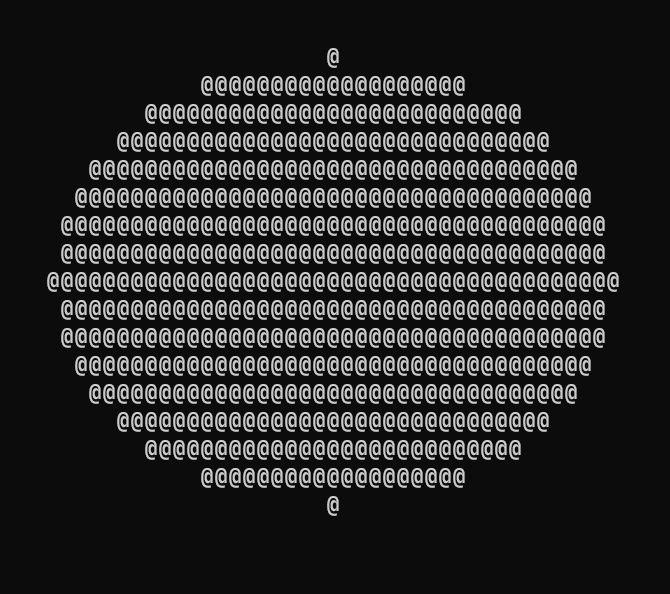
it works, but its an oval.
making the circle actually round #
Two things are squashing it:
- im stretching the picture to fill the whole terminal no matter what shape the window is. A 4:3 picture forced into a wide short window gets squashed.
- a character cell isnt square. Its about twice as tall as it is wide.
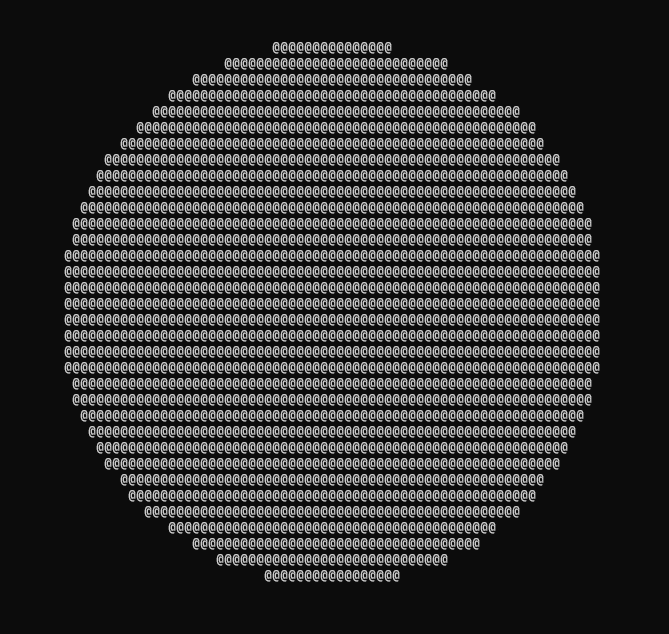
So before printing i work out an output size that keeps the pictures shape, kinda like black bars on a movie.
void ascii_fit (const Frame *f, int max_cols, int max_rows, int *out_cols, int *out_rows) {
    // as wide as the terminal
    int cols = max_cols;
    int rows = cols * f->height / f->width / 2;

    // as tall as the terminal
    if (rows > max_rows) {
        rows = max_rows;
        cols = rows * f->width * 2 / f->height;
    }

    *out_cols = cols;
    *out_rows = rows;
}
more math.. what made it click was thinking of it like a recipe. 4 apples cost 2 dollars, what do 10 apples cost? Find the price of one apple (2 / 4), multiply by how many you have (10). So:
what i have * (total of what i WANT / total of what i HAVE)
for the picture: its 640 wide and 480 tall, i have a width of 120 columns, what height do i want? 120 * 480 / 640 = 90. Height goes on top because height is what i want, width goes on the bottom because width is what i have. (and again the multiply goes first so the int division doesnt eat the fraction.)
the / 2 at the end is a separate thing, each text row is twice as tall as a column is wide, so 90 "units" of height is only 45 rows.
then the if: 45 rows doesnt fit in a terminal thats 29 rows tall. So flip it around, use all 29 rows and work out the columns instead. Same formula backwards, the / 2 becomes * 2 and width and height swap places: 29 * 2 * 640 / 480 = 77. So a 120x29 terminal prints the picture at 77x29.
Phew thats it, now, in main.c it gets called like this, right before printing:
int fit_cols, fit_rows;
ascii_fit(&first_frame, cols, rows - 1, &fit_cols, &fit_rows); // -1 to leave one line for the shell

ascii_print(&first_frame, fit_cols, fit_rows);
the rows - 1 leaves a line free for the shell prompt so the top of the picture doesnt scroll away.
making it move #
a loop and a moving circle #
Very good, but a camera is constantly feeding the program new pictures, it moves. Our circle is stationary it just prints once and thats it, so how to test the loop? Make the circle move.
First frame_fill_circle gets two more parameters so the caller picks where the centre is:
void frame_fill_circle (Frame *f, int center_x, int center_y);
then the loop:
for (int i = 0; ; i++) {
    int center_x = i * 10 % first_frame.width;
    int center_y = first_frame.height / 2;

    frame_fill_circle(&first_frame, center_x, center_y);

    // getting the exact size of the terminal
    int cols, rows;
    if (!get_size_terminal(&cols, &rows)) {
        printf("Error: Could not get the size of the terminal.\n");
        return EXIT_FAILURE;
    }

    int fit_cols, fit_rows;
    ascii_fit(&first_frame, cols, rows - 1, &fit_cols, &fit_rows); // -1 to leave one line for the shell

    ascii_print(&first_frame, fit_cols, fit_rows);

    Sleep(33);
}
i * 10 moves the circle 10 pixels to the right every loop. The % (remainder) makes it wrap around like a clock. Once it hits the width it starts from 0 again. Sleep(33) waits 33 milliseconds which is roughly 30 frames a second.
I put the terminal size check inside the loop on purpose so if i resize the window while its running the picture changes too.
it works but every picture gets printed below the last one so the terminal just scrolls forever.
drawing in place with escape codes #
The terminal has a cursor, its the spot where the next character goes. After a picture is printed the cursor is at the bottom so the next one goes below it. The fix is to move the cursor back to the top left before every picture so the new one gets drawn over the old one.
You move the cursor by printing an escape code. Its a special sequence of characters the terminal obeys instead of showing:
\x1b[Hmove the cursor to the top left\x1b[2Jclear the whole screen\x1b[?25lhide the cursor\x1b[?25hshow the cursor
\x1b is the escape character (1B in hex, 27 in decimal) and every one of these starts with it.
Windows has to be told to obey these first. The console has a "mode" which is one number where every bit is an on/off switch, and theres a switch for escape codes:
static DWORD original_mode;

bool enable_ansi_terminal (void) {
    HANDLE out = GetStdHandle(STD_OUTPUT_HANDLE);
    DWORD mode;

    if (!GetConsoleMode(out, &mode)) {
        return false;
    }

    original_mode = mode;

    return SetConsoleMode(out, mode | ENABLE_VIRTUAL_TERMINAL_PROCESSING) != 0;
}

void restore_terminal (void) {
    HANDLE out = GetStdHandle(STD_OUTPUT_HANDLE);

    SetConsoleMode(out, original_mode);
}
read the current mode, turn on the one switch with | (bitwise or) which leaves all the other switches alone, write it back. I also save the original mode in a static variable (static here means only this file can see it) so i can put it back exactly how i found it when the program exits.
The != 0 is there because windows functions return BOOL which is really just an int from before C had a bool type. So that converts it to a real bool.
then in main its one clear before the loop and one cursor home inside it:
printf("\x1b[2J"); // before the loop

printf("\x1b[H");  // inside the loop right before ascii_print
This is also where the buffer in ascii_print pays off. Printing ~2000 characters one putchar at a time means the terminal can redraw halfway through a picture and you see flicker. One fwrite per frame and its smooooth.
exiting cleanly #
The loop never ends so the only way out is ctrl+c and ctrl+c kills the program on the spot. The code after the loop never runs, so the frame never gets freed and the cursor stays hidden.
So i ask windows to tell me about ctrl+c instead of killing my program instantly:
static volatile bool keep_running = true;

// handle ctrl+c so it exits cleanly
static BOOL WINAPI on_ctrl_c (DWORD type) {
    if (type == CTRL_C_EVENT) {
        keep_running = false;
        return TRUE;
    }

    return FALSE;
}
and register it with SetConsoleCtrlHandler(on_ctrl_c, TRUE). The handler just flips a flag, the loop condition becomes keep_running and when it goes false the loop ends on its own and the cleanup under it runs like normal. volatile tells the compiler the variable can change behind its back (windows calls the handler from outside my loop) so it has to actually re-read it every time. (this program would most likely still work without it, but only by luck of how its compiled, so for the sake of being correct ill keep it in).
SetConsoleCtrlHandler(on_ctrl_c, TRUE); // register the handler
printf("\x1b[?25l"); // hide the blinking cursor

// clr the screen
printf("\x1b[2J");
for (int i = 0; keep_running; i++) {
    // ... same loop as before ...
}

// cleanup
frame_destroy(&first_frame);
printf("\x1b[?25h"); // show the cursor again
restore_terminal();
note: i made a hex editor in C a while back and remembered having to restore the terminal on exit, otherwise the arrow keys would type escape codes into the shell. That was the input side (raw mode). This is the output side so the arrow keys were never in danger but putting things back how you found them is good manners either way.
the webcam #
how do you even get a frame #
Now the part i skipped at the start. C has no standard way to talk to a webcam so naturally you would have to go through the OS. On windows the options were roughly:
- Media Foundation: the "modern" windows api for cameras and video
- piping raw frames in from ffmpeg: way less code, but needs ffmpeg installed and it does the hard part for you
- Video for Windows: from the 90s, simple but can be kinda flaky with modern cameras
- DirectShow: older and deprecated
- a wrapper library: then the capture is a black box
I went with Media Foundation. I wanted to see how a real windows api works. The catch is that its built on COM which is an object system designed with C++ in mind so using it from plain C is wordy (you'll see what i mean in a second).
Three rules:
- every function returns a status code called an
HRESULT. You check it withFAILED(hr)orSUCCEEDED(hr). - you have to switch the system on before using it and off when youre done.
- anything it hands you, you have to give it back. Same idea as
mallocandfree.
switching it on, and COM in C #
#define COBJMACROS

#include <windows.h>
#include <mfapi.h>
#include <mfidl.h>
#include <mfreadwrite.h>
HRESULT hr = CoInitializeEx(NULL, COINIT_MULTITHREADED);

if (FAILED(hr)) {
    return false;
}

hr = MFStartup(MF_VERSION, MFSTARTUP_FULL);
if (FAILED(hr)) {
    CoUninitialize();
    return false;
}
CoInitializeEx switches on COM, MFStartup switches on Media Foundation on top of it. They get switched off in reverse order (MFShutdown then CoUninitialize), last in first out like a stack. You only undo what actually started, thats why the second check only calls CoUninitialize.
The #define COBJMACROS has to come before the includes (include is literally copy paste and the headers check for it while theyre being pasted in). If you dont define it first, calling a method on a COM object in C would look like this:
settings->lpVtbl->Release(settings);
with it, you get a macro for every method:
IMFAttributes_Release(settings);
the pattern is always type name, underscore, method name and the object goes in as the first argument. All the examples in the microsoft docs are C++ (settings->Release()) so you translate with that rule.
this whole api felt like a black box until i noticed its the same thing i already wrote myself:
| mine | theirs |
|---|---|
frame_create(&first_frame, ...) |
MFCreateAttributes(&settings, 1) |
frame_fill_circle(&first_frame, ...) |
IMFAttributes_SetGUID(settings, ...) |
frame_destroy(&first_frame) |
IMFAttributes_Release(settings) |
an "object" is a struct and its "methods" are functions that take the struct first. Just with much longer names.
The code for all of this lives in separate libraries so the linker needs to know about them, thats why i updated the build.bat to:
cl /nologo /W4 /std:c17 /Zi src\*.c /Fe:build\ascii_cam.exe /Fo:build\ /Fd:build\ /link mfplat.lib mf.lib mfreadwrite.lib mfuuid.lib ole32.lib
the header only says "this function exists", the actual .lib is where the linker finds it. You dont wanna get "unresolved external symbol"ed.
finding the camera #
Before opening anything i just wanted to list the cameras by name to see if i could talk to this thing at all.
IMFAttributes *settings = NULL;
IMFActivate **devices = NULL;
UINT32 count = 0;
bool ok = false;

// setting up the settings box
hr = MFCreateAttributes(&settings, 1);
if (FAILED(hr)) goto cleanup;

// put the camera request setting in it
hr = IMFAttributes_SetGUID(settings, &MF_DEVSOURCE_ATTRIBUTE_SOURCE_TYPE, &MF_DEVSOURCE_ATTRIBUTE_SOURCE_TYPE_VIDCAP_GUID);
if (FAILED(hr)) goto cleanup;

// ask windows for the list of cameras
hr = MFEnumDeviceSources(settings, &devices, &count);
if (FAILED(hr)) goto cleanup;

for (UINT32 i = 0; i < count; i++) {
    WCHAR *name = NULL;
    UINT32 length = 0;

    hr = IMFActivate_GetAllocatedString(devices[i], &MF_DEVSOURCE_ATTRIBUTE_FRIENDLY_NAME, &name, &length);
    if (SUCCEEDED(hr)) {
        printf("%u: %ls\n", i, name);
        CoTaskMemFree(name); // free up the memory
    }
}
in plain words, make a small settings box, put one setting in it ("im looking for video cameras"), hand it to windows and get back a list.
the name comes back as a WCHAR string (2 bytes per character, windows uses these so any language works) which you print with %ls instead of %s. Windows allocated it so it has to be freed with windows' free, CoTaskMemFree.

boom! it found my camera.
goto cleanup #
every one of those calls can fail and by the end there are several things to give back. Writing the tidy up after every single failure would be a mess so everything starts as NULL or 0 at the top and every failure jumps to one label at the bottom:
    ok = true;

cleanup:
    // give back each camera in the list
    for (UINT32 i = 0; i < count; i++) {
        IMFActivate_Release(devices[i]);
    }

    // give back the list itself
    CoTaskMemFree(devices);

    // give back the settings box if we ever got one
    if (settings != NULL) {
        IMFAttributes_Release(settings);
    }

    MFShutdown();
    CoUninitialize();
    return ok;
because everything started as NULL, the cleanup can tell what was actually obtained no matter which line jumped there. The cameras get released before the list, because the list is what tells me where the cameras are.
opening the camera #
Listing was the warm up part.. Opening is a chain where each object is used to get the next one:
settings -> devices[0] -> source -> reader -> pictures
settings: "i want cameras"devices[0]: a camerasource: that camera, switched onreader: the thing you ask for pictures one at a time
this picks up right after the list comes back:
// if no camera found
if (count == 0) goto cleanup;

// switch on the first camera
hr = IMFActivate_ActivateObject(devices[0], &IID_IMFMediaSource, (void **) &source);
if (FAILED(hr)) goto cleanup;

// make a reader for it, allowed to convert pixel formats for us
hr = MFCreateAttributes(&reader_settings, 1);
if (FAILED(hr)) goto cleanup;

hr = IMFAttributes_SetUINT32(reader_settings, &MF_SOURCE_READER_ENABLE_ADVANCED_VIDEO_PROCESSING, TRUE);
if (FAILED(hr)) goto cleanup;

hr = MFCreateSourceReaderFromMediaSource(source, reader_settings, &reader);
if (FAILED(hr)) goto cleanup;

// ask for pictures in the NV12 format
hr = MFCreateMediaType(&type);
if (FAILED(hr)) goto cleanup;

hr = IMFMediaType_SetGUID(type, &MF_MT_MAJOR_TYPE, &MFMediaType_Video);
if (FAILED(hr)) goto cleanup;

hr = IMFMediaType_SetGUID(type, &MF_MT_SUBTYPE, &MFVideoFormat_NV12); // in NV12 the first width * height bytes are the brightness of each pixel which are the ones i need
if (FAILED(hr)) goto cleanup;

hr = IMFSourceReader_SetCurrentMediaType(reader, (DWORD) MF_SOURCE_READER_FIRST_VIDEO_STREAM, NULL, type);
if (FAILED(hr)) goto cleanup;

IMFMediaType_Release(type);
type = NULL;

// find out how big the pictures are
hr = IMFSourceReader_GetCurrentMediaType(reader, (DWORD) MF_SOURCE_READER_FIRST_VIDEO_STREAM, &type);
if (FAILED(hr)) goto cleanup;

hr = IMFMediaType_GetUINT64(type, &MF_MT_FRAME_SIZE, &size);
if (FAILED(hr)) goto cleanup;

// width is top 32 bit, height is bottom 32 bit so i use sum bitwise ops
cam_width = (int) (size >> 32);
cam_height = (int) (size & 0xFFFFFFFF);
*width = cam_width;
*height = cam_height;

ok = true;
its long but every block is one arrow in that chain plus "if that failed goto cleanup".
Why NV12: cameras can hand out pictures in a bunch of formats. In NV12 the first width * height bytes are the brightness of every pixel, one byte each, row by row. Thats exactly how my Frame stores a picture. The colour info comes after those bytes and i just ignore it. The reader setting (ENABLE_ADVANCED_VIDEO_PROCESSING) lets the reader convert to NV12 for me if the camera natively gives something else.
The frame size comes back as one 64 bit number with the width packed in the top 32 bits and the height in the bottom 32. size >> 32 slides the top half down to get the width, size & 0xFFFFFFFF keeps only the bottom half for the height. My laptops camera gives 1920x1080, so about 2 million pixels per frame.
the reader is a static variable at the top of the file because it has to survive between function calls (open, then read many times, then close):
static IMFSourceReader *reader = NULL;
static int cam_width = 0;
static int cam_height = 0;

void camera_close (void) {
    if (reader != NULL) {
        IMFSourceReader_Release(reader);
        reader = NULL;
    }

    MFShutdown();
    CoUninitialize();
}
and the cleanup at the end of camera_open got three more things to give back plus one change: if the open worked i want Media Foundation left ON so i can read pictures later (so it only shuts down on failure).
cleanup:
    if (type != NULL) {
        IMFMediaType_Release(type);
    }

    if (reader_settings != NULL) {
        IMFAttributes_Release(reader_settings);
    }

    if (source != NULL) {
        IMFMediaSource_Release(source);
    }

    // give back each camera in the list
    for (UINT32 i = 0; i < count; i++) {
        IMFActivate_Release(devices[i]);
    }

    // give back the list itself
    CoTaskMemFree(devices);

    // give back the settings box if we ever got one
    if (settings != NULL) {
        IMFAttributes_Release(settings);
    }

    if (!ok) {
        camera_close();
    }

    return ok;
releasing source is fine even though the reader is using it because the reader keeps its own hold on the camera. An object only gets deleted once everyone holding it has let go.
reading a frame #
bool camera_read_frame (Frame *f) {
    IMFSample *sample = NULL;
    IMFMediaBuffer *buffer = NULL;
    BYTE *data = NULL;
    DWORD length = 0;
    DWORD flags = 0;
    HRESULT hr;
    bool ok = false;

    // the frame must be the same size as the cameras pictures
    if (f->width != cam_width || f->height != cam_height) {
        printf("Error: Frame size does not match the camera.\n");
        return false;
    }

    // sometimes the camera doesnt send stuff instantly so now keep asking for a pic till it arrives
    while (sample == NULL) {
        hr = IMFSourceReader_ReadSample(reader, (DWORD) MF_SOURCE_READER_FIRST_VIDEO_STREAM, 0, NULL, &flags, NULL, &sample);

        if (FAILED(hr) || (flags & MF_SOURCE_READERF_ENDOFSTREAM)) {
            return false;
        }
    }

    // get the pictures byte as one block
    hr = IMFSample_ConvertToContiguousBuffer(sample, &buffer);
    if (FAILED(hr)) goto cleanup;

    hr = IMFMediaBuffer_Lock(buffer, &data, NULL, &length);
    if (FAILED(hr)) goto cleanup;

    if (length >= (DWORD) (cam_width * cam_height)) {
        for (int y = 0; y < f->height; y++) {
            uint8_t *frame_row = f->pixels + y * f->stride; // start of row y in our frame
            BYTE *camera_row = data + y * cam_width; // start of row y in the cameras memory

            memcpy(frame_row, camera_row, f->width);
        }

        ok = true;
    }

    IMFMediaBuffer_Unlock(buffer);

cleanup:
    if (buffer != NULL) {
        IMFMediaBuffer_Release(buffer);
    }

    IMFSample_Release(sample);
    return ok;
}
the chain continues: reader -> sample -> buffer -> data
ReadSamplewaits for the next picture and gives back a sample. Sometimes it answers with nothing (when the camera is still warming up) so i loop until i get one.ConvertToContiguousBuffergets the pictures memory as one single block.Lockgives medata, a plain pointer to the bytes, andlength, how many bytes there are. "lock" means im reading this so dont move it.
after Lock, data is the same kind of thing as my pixels: a pointer to a row of bytes where the first width * height are brightness. I have to copy them out into my own frame because the cameras memory gets taken back as soon as i release it.
plugging it into the loop #
main.c barely changes. Open the camera, make the frame the cameras size instead of 640x480 and swap the circle for camera_read_frame:
int main (void) {
    int camera_width, camera_height;

    if (!camera_open(&camera_width, &camera_height)) {
        printf("Error: Could not open camera.\n");
        return EXIT_FAILURE;
    }

    Frame first_frame;

    // create the frame (whatever resolution it is)
    if (!frame_create(&first_frame, camera_width, camera_height)) {
        printf("Error: Could not create frame.\n");
        return EXIT_FAILURE;
    }

    // enable vt sequences
    if (!enable_ansi_terminal()) {
        printf("Error: Could not enable switch codes for the terminal.\n");
        return EXIT_FAILURE;
    }

    SetConsoleCtrlHandler(on_ctrl_c, TRUE); // register the handler
    printf("\x1b[?25l"); // hide the blinking cursor

    // clr the screen
    printf("\x1b[2J");
    while (keep_running) {
        if (!camera_read_frame(&first_frame)) {
            break;
        }

        // getting the exact size of the terminal
        int cols, rows;
        if (!get_size_terminal(&cols, &rows)) {
            printf("Error: Could not get the size of the terminal.\n");
            break;
        }

        int fit_cols, fit_rows;
        ascii_fit(&first_frame, cols, rows - 1, &fit_cols, &fit_rows); // -1 to leave one line for the shell

        // move the cursor home so the terminal doesnt scroll
        printf("\x1b[H");

        // crunching the camera resolution pic down to whatever outputs cleanly in the terminal
        ascii_print(&first_frame, fit_cols, fit_rows);
    }

    // cleanup
    camera_close();
    frame_destroy(&first_frame);
    printf("\x1b[?25h"); // show the cursor again
    restore_terminal();

    return EXIT_SUCCESS;
}
the Sleep(33) is gone because ReadSample already waits for the cameras next picture and the loop doesnt need the i counter anymore so its just a plain while loop now.
ascii_print, ascii_fit and the terminal code didnt change at all. They get a Frame full of brightness numbers and dont care whether a gradient, a circle or a webcam put them there. Thats the payoff of keeping "fill the frame" and "print the frame" as two separate jobs.
Voila! I am the one who renders. (webcam pointed at my phone)
Tip: you can shrink the terminal font (ctrl and minus in windows terminal). Smaller characters means more of them fit and since the code already adapts to the terminal size every frame, the picture gets way more detailed for free.
wrapping up #
Aaand thats it. Around 400 lines of C, no libraries other than what windows ships with, my webcam is in my terminal.
the things that stuck with me:
- a 2D picture is just one long row of bytes, and
y * stride + xfinds any pixel in it (the index) - with ints you multiply first and divide last
- one formula (what i have * what i want / what i have) did the gradient, the ramp, the downscaling and the aspect ratio
- everything the OS hands you has to be given back in reverse order (for the most part)
- keeping "fill the frame" and "print the frame" separate is why the webcam dropped in without touching the printing code (gotta love modular code)
the repo has a bit more than this post covers. After getting it working i added auto contrast (so it still looks good in a dim room) and keyboard controls to toggle it while its running. I might add more to it later on.
the code is here: github.com/ManiiChem/c-ascii_cam
resources #
the official docs behind each part, if you want to build something like this yourself.
the console side:
- CONSOLE_SCREEN_BUFFER_INFO and GetConsoleScreenBufferInfo: getting the terminal size, and dwSize vs srWindow
- Console Virtual Terminal Sequences: the full list of escape codes windows understands
- SetConsoleMode: the mode switches, including the one for escape codes
- SetConsoleCtrlHandler: catching ctrl+c
the camera side (Media Foundation):
- Audio/Video Capture in Media Foundation: the overview
- Enumerating Video Capture Devices: finding the camera (examples are in C++)
- Using the Source Reader to Process Media Data: the reader, and asking it for frames
- MFEnumDeviceSources and IMFSourceReader::ReadSample: the reference pages, which say what you have to release
- Recommended 8-Bit YUV Formats for Video Rendering: how NV12 is laid out
the compiler:
- /std (Specify Language Standard Version): which C standards msvc has a switch for